
- Monthly visits
- 944.2K
- Pricing
- Free plan
- Free, Pro, Max
About BeautyPlus
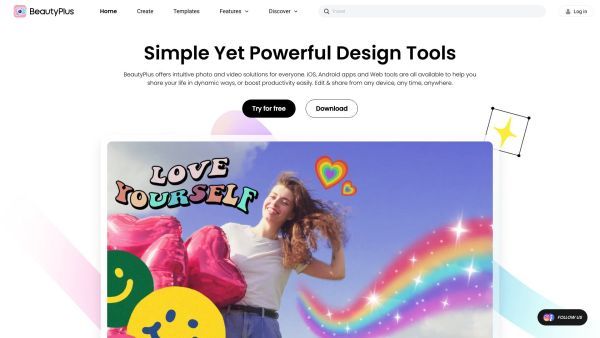
BeautyPlus is an AI-powered platform for creating, editing, and enhancing photos and videos. It provides tools for selfies, portraits, filters, virtual try-ons, and AI-powered photo editing, aiming to make editing and expressive. The service emphasizes applying AI to everyday media tasks and to help users develop and share polished visuals across online platforms.
The platform combines creative tools with AI capabilities to enable users to edit, enhance, and compose visual content. It offers features like background removal, object removal, and automatic improvements, along with options to generate new visuals and prepare images for commercial use, all in a single workflow.
Users access a suite of tools for photo and video editing, including AI image and video edits, background changes, and collage creation. The tools are designed to work together, enabling users to generate content and enhance existing media.
BeautyPlus presents its services as a comprehensive AI-powered editing platform with an emphasis on creative experimentation and practical enhancements across both mobile and web environments.
Use cases
- Edit photos and videos with AI-powered tools for social media, marketing, or personal projects.
- Create AI-generated images and edited visuals for profiles, ads, or portfolios.
Key features
- AI Image Editing & Design turns ideas into polished visuals, with editing, backgrounds, and exports.
- AI Background Remover removes the background from images for transparent or colored backgrounds.
- AI Object Remover erases unwanted elements from photos.
- AI Image Enhancer sharpens details and fixes lighting.
- AI Hairstyle Changer lets users preview new hairstyles instantly.
- AI Clothes Changer swaps outfits digitally to visualize new looks.
- AI Headshot Generator creates polished headshots from uploaded photos.
- Image Watermark Remover removes watermarks while preserving quality.
- Background Remover and Changer tools offer background replacement and color edits.
- Pro-Level Retouch tools provide natural-looking enhancements.
Pricing
- limited usage
- Limited access to AI features
- Export with watermark
- Unlimited Photo Enhancer
- Video Enhance: 2,400s/mo
- AI Object Remover: 40+ images/mo
- AI Image Creation: 40+ images/mo
- Access to Premium Assets
- No Watermarks on HD Exports
- Everything in Pro
- Unlimited AI UHD Enhancement
- Video Enhance: 6,000s/mo
- UHD Video Enhance: 2,000s/mo
- AI Object Remover: 100+ images/mo
- AI Image Creation: 100+ images/mo
- Unlimited Premium Assets
- Watermark-Free 4K/HD Exports
Reviews
Frequently asked questions
How do I remove background from an image using this AI remover?
Can I add a white background to a photo?
Alternatives to BeautyPlus
More in AI Photo Editor
SnapMerge
SnapMerge combines 2 to 3 similar group photos into one best take, using each person's best real expression to fix blinks and turned faces.
FaceAnalysis
FaceAnalysis gives face photos a free AI 1-10 attractiveness estimate and face shape, with a paid report on hair, skin, style, posture and photos.

Image to Claymation
Image to Claymation is an AI image editor that turns photos of people, pets, products and places into stop-motion style clay artwork.

Stylize Image
Stylize Image is a browser-based AI photo editor that applies art styles, colorizes old photos, removes backgrounds and upscales images for creators.

AI Hairstyle
AI Hairstyle lets people try more than 1,000 real hairstyles on their own photo to preview a haircut or hair color before a salon or barber visit.
Seavid AI
Seavid AI is a browser platform for making AI videos and images from text, photos and references using third-party models such as Seedance, Veo and Kling.