List your AI tool on AI Orion for free. Submit a tool

Selfie AI

Selfie AI — Peaky Blinders, Boudoir & 100+ AI Selfie Styles

Added
Mar 24 2025
Selfie AI website

About Selfie AI

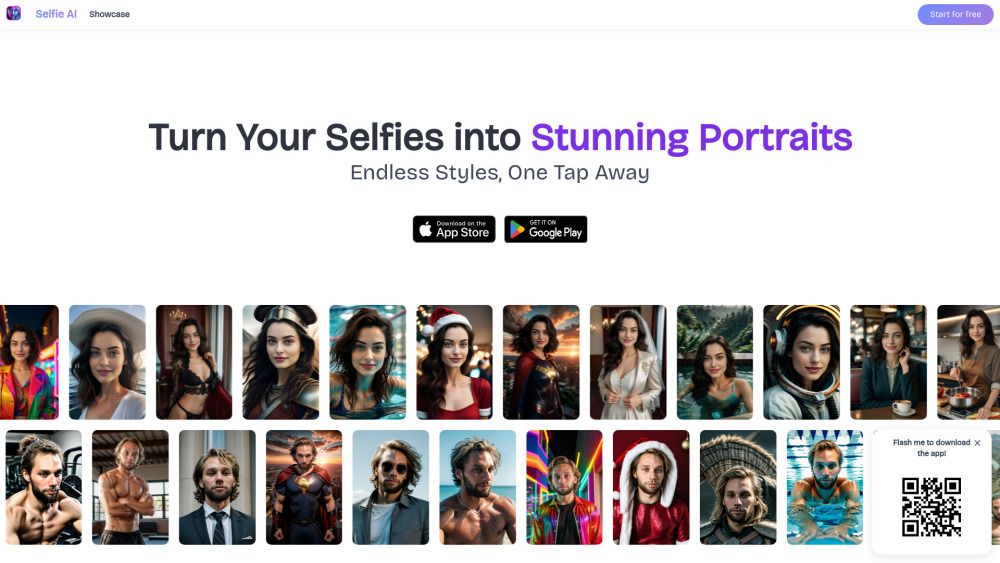
Selfie AI generates studio-grade photos and animated clips from a single selfie, optimized for social feeds and mobile delivery. It targets creators who want quick, publish-ready visuals without desktop editing, combining a portrait studio with video automation. The app emphasizes mobile-first workflow and fast renders to support social media content strategies.

The product trains AI models on user selfies to produce multiple portrait outputs, with a pipeline that maps angles, lighting, and lenses to various looks. It presents a streamlined process from upload to export, designed for ease of use on phones and tablets. Privacy controls and automatic training data handling are part of the workflow.

In-app features include portrait templates and video modes to create looping clips, with presets sized for Reels, Shorts, and Stories. The tool supports vertical and horizontal exports and aims to deliver ready-to-share visuals across major platforms.

It also highlights privacy measures like removing training images after 30 days and encryption during storage. The product appears to offer free credits and paid options for continued use.

Use cases

  • Professional profiles and business cards
  • Social content and personal branding
  • Campaigns and branding assets

Key features

  • Unlimited AI Models
  • Single selfie mapping
  • 40+ Style Categories
  • Create Custom Prompts
  • Portrait Video Templates
  • Easy Download & Share
  • Video Mode for AI portraits
  • Privacy controls

Pros and cons

Pros

Mobile-first workflow designed for iPhone and Android
In-app video mode and export options for social media

Reviews

No reviews yet. Used Selfie AI? Be the first to review it.Log in to review

Frequently asked questions

Do I need professional lighting or a DSLR?
No. A clear smartphone selfie in natural light is enough. The app enhances lighting, sharpens details, and adjusts backgrounds automatically.
Can I edit or remove generated photos?
Yes. Delete any render instantly and retrain your model with new selfies whenever you want to update your look.
Is Selfie AI free?
Yes, Selfie AI is free to download on both iOS and Android. When you start, you'll receive 10 free credits (enough for 2 pictures). After using your free credits, you can either purchase additional credit packages or subscribe to our weekly plan to receive fresh credits automatically. Pricing details are available in the app.
How can I stop the subscription?
You can cancel your subscription anytime through your device's app store settings. For iPhone users, go to Settings > Apple ID > Subscriptions, find Selfie AI, and tap 'Cancel Subscription'. For Android users, open Google Play Store > Profile > Payments & subscriptions > Subscriptions, find Selfie AI, and select 'Cancel subscription'. Your subscription will remain active until the end of your current billing period.

Alternatives to Selfie AI

More in AI Social Media Assistant

Comparing tools