About Noteey
What is Noteey?
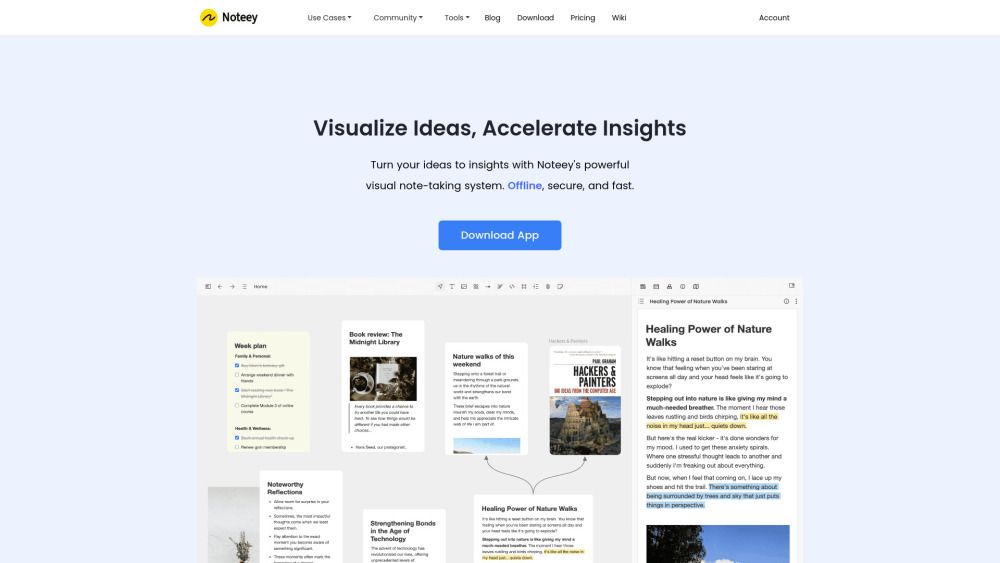
Noteey is a visual note-taking app designed to help users make sense of complex thoughts and big ideas. It offers a variety of features that enhance the note-taking experience, allowing for seamless integration of different types of content.
With Noteey, users can take advantage of an all-in-one infinite canvas that supports text, images, cards, PDFs, mind mapping, videos, and drawing tools. This versatility makes it an ideal tool for various applications, including research, creative writing, and project management.
Presentation mode for showcasing knowledge and ideas.
Floating windows for reviewing and annotating multiple PDFs, videos, and audios.
PDF annotations with search, highlights, and insights.
Deep linking for integration with other apps.
Video note-taking with timestamp linking.
Drawing tools for creating sketches and diagrams.
Noteey Features
Noteey is a comprehensive Visual Knowledge System designed to enhance knowledge management and facilitate the transformation of ideas into insights. It offers an all-in-one infinite canvas that supports various content types, including text, images, PDFs, videos, and mind maps, allowing users to organize their thoughts and research visually.
Key features of Noteey include:
Offline data storage for easy access without an internet connection.
Local backup and sharing capabilities, enabling users to save and share projects seamlessly.
PDF annotation tools for highlighting and making notes directly on documents.
Deep linking for easy integration with other applications.
A video note-taking feature that allows users to link notes with timestamps for efficient review.
Drawing tools for creating sketches, diagrams, and flowcharts.
Presentation mode to showcase ideas effectively.
Floating windows for simultaneous review and annotation of multiple documents.
Why Noteey?
Noteey offers a powerful visual note-taking system that enhances productivity and creativity through its all-in-one knowledge management solution. With features like offline access, local backup, and seamless sharing, users can easily organize and create on an infinite canvas. This flexibility allows for a more engaging and effective learning experience, making it ideal for visual learners.
Some of the key benefits of using Noteey include:
Comprehensive PDF annotations and highlights to discover new insights.
Video note-taking capabilities that link notes with timestamps for easy review.
A unique deep linking feature that integrates with other apps for enhanced functionality.
Presentation mode to showcase knowledge and ideas effectively.
Floating windows for simultaneous review and annotation of multiple documents.
How to Use Noteey
To get started with Noteey, first, download the app and create an account if you wish to access premium features. Once installed, you can begin by exploring the all-in-one infinite canvas, where you can integrate text, images, PDFs, and videos seamlessly. This allows you to organize your thoughts and ideas visually, making it easier to manage complex topics.
Utilize the various tools available in Noteey to enhance your productivity. Here are some key features to explore:
PDF Annotations: Highlight and annotate PDFs to extract insights.
Video Note Taker: Take notes linked with timestamps while watching videos.
Drawing Tool: Create sketches and diagrams to visualize your ideas.
Presentation Mode: Showcase your knowledge effectively.
Floating Windows: Review and annotate multiple documents simultaneously.
Ready to see what Noteey can do for you?and experience the benefits firsthand.
Key Features
How to Use
Visit the Website
Navigate to the tool's official website.
Pros & Cons
What's good
What's not good
Pricing
- Desktop Pro license
- Unlimited web publishing
- Web version (coming soon)
- Priority support
- Desktop Pro license
- Unlimited web publishing
- Web version (coming soon)
- Priority support
- Desktop Pro license
- Unlimited web publishing
- Web version (coming soon)
- Priority support
- Built for small teams and power users
- 8 devices (MacOS or Windows)
- Unlimited local projects
- Publish small projects to web (up to 20mb)
- Pay once, use forever
Noteey Traffic Analysis
Frequently Asked Questions
Alternatives to Noteey
Studocu Global
A platform for accessing shared study materials globally.

Suno
Suno is an innovative platform that enables users to create stunning original music in seconds using artificial intelligence. With its user-friendly interface, individuals can easily craft their own masterpieces, share them with friends, and explore a diverse range of music from artists around the globe. Suno empowers creativity for everyone, from casual singers to aspiring professionals.
Jotform AI Agents
Jotform AI Agents revolutionizes customer service by enabling businesses to respond instantly to customer inquiries anytime and anywhere. With its seamless integration capabilities and user-friendly interface, it enhances operational efficiency and improves customer satisfaction. This innovative solution empowers organizations to provide timely support, ensuring they stay connected with their clients effectively.
Miro
Miro is a powerful visual workspace designed to enhance collaboration and innovation among teams. With over 100 million users across 250,000 organizations, it streamlines product development processes, accelerates time to market, and ensures that new offerings align with customer needs. Miro's integration of AI tools empowers teams to effectively strategize, design, and manage projects throughout the entire innovation lifecycle.
Lovescape AI
Create Your AI Girlfriend for Chatting

Manus
Manus is a versatile AI agent designed to transform thoughts into actions, streamlining tasks in both professional and personal settings. Its primary value lies in its ability to manage various responsibilities efficiently, allowing users to relax while it handles their to-do lists. With Manus, users can experience increased productivity and peace of mind, knowing that their tasks are being completed seamlessly.