- Monthly visits
- 752.5K
- Company
- 38 Long LLC
- Added
- Apr 07 2025
About Hemingway Editor
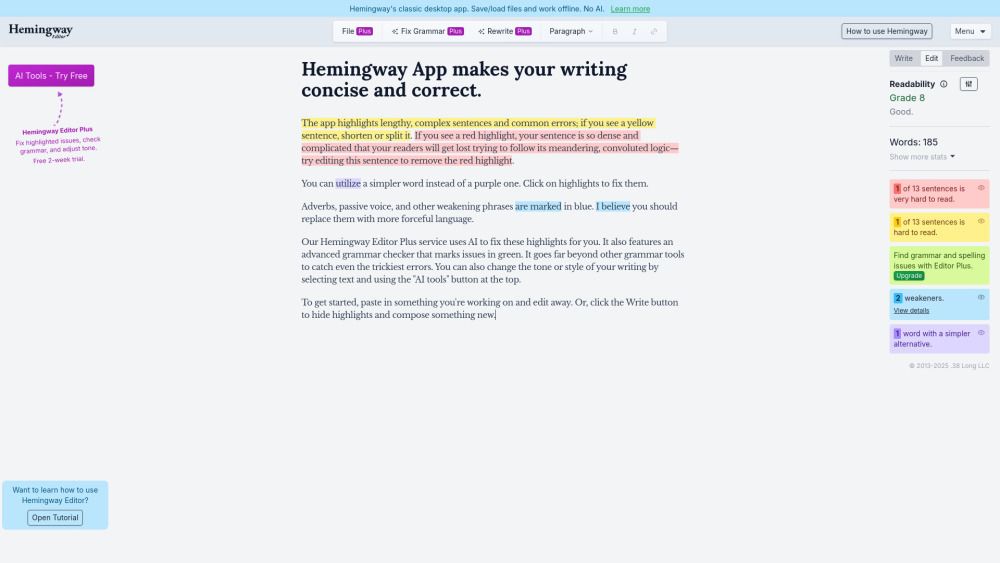
Hemingway Editor helps writers improve clarity and flow by highlighting lengthy or complex sentences, common errors, and weakening phrases, while offering fixes and style options. The tool presents an editable interface where users paste text, see highlighted issues, and adjust tone or style using AI-assisted features. The product targets individuals seeking to improve readability and precision in their writing, with an emphasis on simplifying dense sentences and avoiding hard-to-read constructions.
Hemingway Editor uses a visual approach: it marks sentence complexity and common issues with color-coded highlights and suggests simpler words, rephrasings, or stronger wording. The Plus mode adds AI-powered fixes and extra checks for grammar, clarity, and consistency, with options to apply a chosen style guide and shift tone or style. Users can interact with highlights to apply suggested changes and manage the editing process.
The editor provides readability statistics and a summary of sentence complexity and word use, then offers actions like fixing highlighted items and rewriting text. It supports pasting existing text or composing anew with a Write feature that hides highlights. The tool emphasizes fast editing and clear, direct writing, using highlighted feedback to guide revisions.
It describes options to use the AI tools and to adjust tone or style via a top menu, and references a tutorial for learning how to use the editor.
Use cases
- Improve readability and conciseness in writing
- Identify and fix grammar, clarity, and consistency issues
Key features
- Highlights lengthy, complex sentences and common errors
- Colors indicate different types of issues (blue for adverbs, passive voice, and weakening phrases)
- AI-powered fixes in Hemingway Editor Plus
- Shows green marks for grammar, clarity, and consistency
- Option to change tone or style via the AI tools button
- Writes and edits in a web interface by pasting text or composing anew