About SPSSAU
What is SPSSAU?
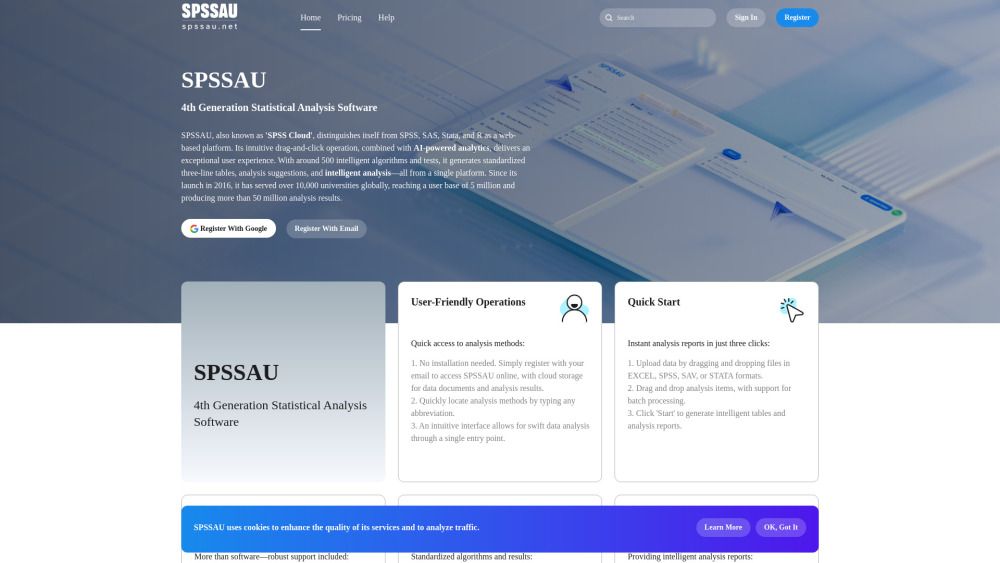
SPSSAU, also known as 'SPSS Cloud', is a 4th generation statistical analysis software that stands out as a web-based platform, differentiating itself from traditional software like SPSS, SAS, Stata, and R. It offers an intuitive drag-and-click operation, enhanced by AI-powered analytics, which collectively provide an exceptional user experience. With approximately 500 intelligent algorithms and tests, SPSSAU generates standardized three-line tables, analysis suggestions, and intelligent analysis—all accessible from a single platform.
Since its launch in 2016, SPSSAU has made a significant impact, serving over 10,000 universities globally and reaching a user base of 5 million, producing more than 50 million analysis results. The software is designed to facilitate quick access to analysis methods and streamline the data analysis process, making it suitable for a diverse range of users, including students, researchers, and data analysts.
SPSSAU Features
SPSSAU, also known as 'SPSS Cloud', is a 4th generation statistical analysis software that offers a user-friendly web-based platform. It features an intuitive drag-and-click operation, allowing users to quickly access analysis methods without the need for installation. Users can simply register with their email to access the software online, benefiting from cloud storage for data documents and analysis results. The platform supports various data formats, including EXCEL, SPSS, SAV, and STATA, enabling users to upload data effortlessly by dragging and dropping files.
With around 500 intelligent algorithms and tests, SPSSAU generates standardized three-line tables and provides analysis suggestions and intelligent interpretations of results. The software is designed to produce instant analysis reports in just three clicks, making it efficient for users across different fields, including academic research and market studies. Additionally, SPSSAU offers robust support services, including professional assistance for data analysis challenges and a comprehensive help manual for deeper insights into complex issues.
User-friendly operations with quick access to analysis methods.
Instant analysis reports generated in just three clicks.
Comprehensive support services, including analysis suggestions and professional assistance.
Standardized algorithms and outputs consistent with other statistical software.
AI-powered analytics for intelligent analysis reports.
Why SPSSAU?
SPSSAU offers numerous benefits that make it an attractive choice for users across various fields, including academic research, statistical education, and market analysis. Its user-friendly operations allow for quick access to analysis methods without the need for installation, enabling users to register online and utilize cloud storage for their data documents and results. The platform's intuitive interface facilitates swift data analysis, making it accessible for both beginners and experienced analysts.
Some key advantages of using SPSSAU include:
Instant analysis reports generated in just three clicks, streamlining the data analysis process.
Comprehensive support services, including analysis suggestions and professional assistance for data challenges.
Standardized algorithms and outputs that align with other statistical software, ensuring consistency and reliability in results.
AI-powered analytics that provide intelligent insights and recommendations for complex data analysis tasks.
How to Use SPSSAU
Getting started with SPSSAU is straightforward and user-friendly, making it accessible for everyone from students to experienced data analysts. To begin, simply register with your email to access the platform online, eliminating the need for installation. Once registered, you can quickly locate analysis methods by typing any abbreviation, thanks to the intuitive interface designed for swift data analysis.
To generate instant analysis reports in just three clicks, follow these steps: first, upload your data by dragging and dropping files in EXCEL, SPSS, SAV, or STATA formats. Next, drag and drop the desired analysis items, with support for batch processing. Finally, click 'Start' to produce intelligent tables and comprehensive analysis reports.
Ready to see what SPSSAU can do for you?and experience the benefits firsthand.
Key Features
How to Use
Visit the Website
Navigate to the tool's official website.
Pros & Cons
What's good
What's not good
Pricing
- Suitable for individual users with small-scale and simple analyses
- Limited customer support
- Limited file storage capacity (10 files)
- Suitable for users who need a quick analysis
- Lasts for 24 hours from the time of purchase
- Limited customer support
- Limited file storage capacity (10 files)
- Suitable for users who need detailed, in-depth research or advanced analyses
- Unlimited daily analysis frequency
- Partially limited customer support
- File storage capacity (100 files)
SPSSAU Traffic Analysis
Alternatives to SPSSAU
Studocu Global
A platform for accessing shared study materials globally.

Suno
Suno is an innovative platform that enables users to create stunning original music in seconds using artificial intelligence. With its user-friendly interface, individuals can easily craft their own masterpieces, share them with friends, and explore a diverse range of music from artists around the globe. Suno empowers creativity for everyone, from casual singers to aspiring professionals.
Jotform AI Agents
Jotform AI Agents revolutionizes customer service by enabling businesses to respond instantly to customer inquiries anytime and anywhere. With its seamless integration capabilities and user-friendly interface, it enhances operational efficiency and improves customer satisfaction. This innovative solution empowers organizations to provide timely support, ensuring they stay connected with their clients effectively.
Lovescape AI
Create Your AI Girlfriend for Chatting

Manus
Manus is a versatile AI agent designed to transform thoughts into actions, streamlining tasks in both professional and personal settings. Its primary value lies in its ability to manage various responsibilities efficiently, allowing users to relax while it handles their to-do lists. With Manus, users can experience increased productivity and peace of mind, knowing that their tasks are being completed seamlessly.
HealCycle
HealCycle is a comprehensive app designed to support individuals dealing with hormonal imbalances, mood swings, and symptoms of PMS or PMDD. It offers personalized symptom insights and science-backed resources, along with a 24/7 AI companion for emotional support, empowering users to take control of their health journey. With HealCycle, users can gain valuable knowledge and tools to enhance their well-being and manage their cycles effectively.