About EchoWave
What is EchoWave?
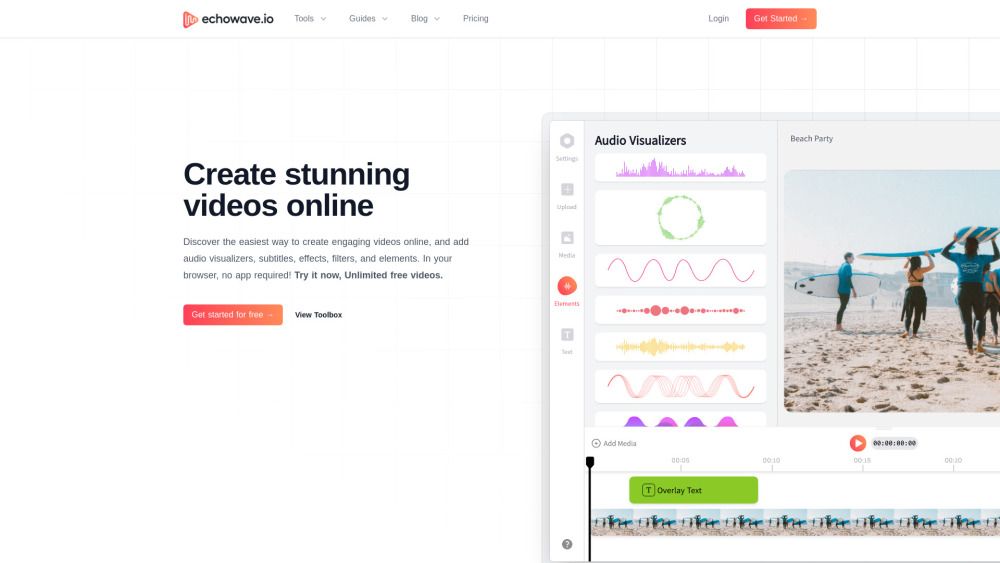
EchoWave is an innovative online platform designed to enhance the way audio content is shared across popular social media networks like Facebook, Twitter, and Instagram. By allowing users to easily convert audio into engaging videos, EchoWave addresses the common challenge of audio sharability, enabling creators to maximize their content's reach and engagement.
The platform offers a user-friendly self-service interface and a variety of intuitive tools for both beginners and professionals. Key features include:
Sound wave makers
Video overlays
Music visualizers
AI auto subtitles generator
Audio waveform generator
EchoWave Features
EchoWave is an online platform that provides intuitive tools for creating, editing, and visualizing audio and video content. It allows users to easily upload audio to social media platforms like Facebook, Twitter, and Instagram, converting audio into engaging videos that can significantly increase audience engagement.
The platform offers a variety of features designed for both beginners and professionals, including:
Sound wave makers
Video overlays
Music visualizers
AI auto subtitles generator
Audio waveform generator
Video editing tools such as trimming, cropping, and merging
Options to add text, images, and watermarks to videos
Why EchoWave?
EchoWave offers a unique value proposition for creators looking to enhance their social media presence by converting audio content into engaging videos. This platform allows users to easily upload audio to popular social networks like Facebook, Twitter, and Instagram, significantly increasing engagement rates by up to 10 times. With an intuitive self-service interface, EchoWave is designed for both beginners and professionals, making it accessible for everyone.
Some of the key benefits of using EchoWave include:
Effortless conversion of audio files to videos without the need for complex software installations.
Enhanced reach for podcasters and musicians by sharing audio snippets or entire episodes as videos with customizable visuals.
Flexible editing tools that allow creators to condense longer videos, add subtitles, and tailor content to their audience.
Affordable pricing plans, including a free forever option, making it easy for creators of all sizes to get started.
How to Use EchoWave
Getting started with EchoWave is simple and intuitive. To begin, sign up for an account on the EchoWave.io platform. Once logged in, you can easily upload your audio files and utilize the various tools available to convert your audio into engaging video content. The self-service interface allows you to customize your videos with overlays, text, and visualizers, making it suitable for both beginners and professionals.
Here are some key features you can explore as you start using EchoWave:
Convert audio to video effortlessly.
Add text and images to enhance your videos.
Utilize music visualizers and sound wave makers for a professional touch.
Share your creations directly to social media platforms like Facebook, Twitter, and Instagram.
Ready to see what EchoWave can do for you?and experience the benefits firsthand.
Key Features
How to Use
Visit the Website
Navigate to the tool's official website.
Pros & Cons
What's good
What's not good
Pricing
- Up to 60 minutes in standard resolution
- Unlimited Videos
- Custom audio waveforms
- Basic visual effects
- High priority rendering at 1080p HD
- No watermark on videos
- Unlimited file upload size
- Everything in Basic, plus:
- Professional 4K Ultra HD
- Smart AI subtitles & captions
- Complete pro editing toolkit
- Advanced editing suite included
- Everything in Basic, plus:
- Team collaboration features
- Priority rendering & dedicated support
- Advanced brand kit & asset management
- Unlimited project renders, storage, exports & more
EchoWave Traffic Analysis
Frequently Asked Questions
Alternatives to EchoWave
Studocu Global
A platform for accessing shared study materials globally.

Suno
Suno is an innovative platform that enables users to create stunning original music in seconds using artificial intelligence. With its user-friendly interface, individuals can easily craft their own masterpieces, share them with friends, and explore a diverse range of music from artists around the globe. Suno empowers creativity for everyone, from casual singers to aspiring professionals.
Jotform AI Agents
Jotform AI Agents revolutionizes customer service by enabling businesses to respond instantly to customer inquiries anytime and anywhere. With its seamless integration capabilities and user-friendly interface, it enhances operational efficiency and improves customer satisfaction. This innovative solution empowers organizations to provide timely support, ensuring they stay connected with their clients effectively.
Lovescape AI
Create Your AI Girlfriend for Chatting

Manus
Manus is a versatile AI agent designed to transform thoughts into actions, streamlining tasks in both professional and personal settings. Its primary value lies in its ability to manage various responsibilities efficiently, allowing users to relax while it handles their to-do lists. With Manus, users can experience increased productivity and peace of mind, knowing that their tasks are being completed seamlessly.
HealCycle
HealCycle is a comprehensive app designed to support individuals dealing with hormonal imbalances, mood swings, and symptoms of PMS or PMDD. It offers personalized symptom insights and science-backed resources, along with a 24/7 AI companion for emotional support, empowering users to take control of their health journey. With HealCycle, users can gain valuable knowledge and tools to enhance their well-being and manage their cycles effectively.