About Sprite Sheet Maker
What is Sprite Sheet Maker?
Sprite Sheet Maker is a powerful tool designed to transform images or sketches into crisp pixel art, complete with tidy outlines and transparency. It allows users to upload their artwork and apply various transformations, such as recoloring, restyling, or creating on-model variations. This tool is particularly beneficial for game developers looking to create animated sprites, as it can turn a single sprite into a looping animation cycle, ensuring that frames are aligned and ready for export.
In addition to sprite creation, Sprite Sheet Maker offers features that enhance the overall design process. Users can generate parallax-ready pixel backgrounds that match their sprite's palette, reskin sprites with different materials, and utilize a built-in pixel editor for final adjustments. The tool provides instant results, allowing for rapid iteration, making it ideal for game jams and quick development cycles.
Transform images into pixel art with transparency.
Create looping animations from single sprites.
Generate matching pixel backgrounds.
Reskin sprites with various materials.
Utilize a built-in pixel editor for final tweaks.
Receive instant results for fast iteration.
Sprite Sheet Maker Features
Sprite Sheet Maker is a powerful tool designed to transform images into crisp pixel art, complete with tidy outlines and transparency. It offers a variety of features that enhance the creation and animation of sprites, making it ideal for game developers and artists alike. Users can upload their artwork and utilize the smart transform feature to recolor, restyle, or create variations of their designs. Additionally, the tool allows for the animation of sprites, enabling the creation of looping idle, walk, or attack cycles that are perfectly aligned and ready for export.
Some of the key features and capabilities of Sprite Sheet Maker include:
Instant results with no waiting times, allowing for rapid iteration.
A built-in pixel editor for fine-tuning details such as nudging pixels and adjusting palettes.
Generation of parallax-ready pixel backgrounds that match the sprite's color palette.
Reskinning options that allow users to change the material of a sprite while maintaining its silhouette.
Creation of sprite packs that provide a matched grid of sprites in a single request.
Export options for various formats, including GIFs and texture atlases for different game engines.
Why Sprite Sheet Maker?
SpriteSheetMaker offers a streamlined approach to character creation and animation, providing a clear decision path that enhances the workflow. Users can create a character candidate, inspect it, and only proceed to motion when the design is deemed satisfactory. This two-stage character workflow allows for discussions around silhouette, direction, outline, and motion before committing to detailed production work, making it easier to evaluate the results.
Some of the key benefits of using SpriteSheetMaker include:
Smart Transform:
Upload art and describe changes like recoloring or restyling.
Animation:
Convert a single sprite into a looping idle, walk, or attack cycle with aligned frames.
Background Generation:
Create parallax-ready pixel backdrops that match your sprite's palette.
Reskinning:
Lock the silhouette and swap materials for multiple finishes.
Instant Results:
Experience no queues or waiting times, with prompts returning in seconds.
Built-in Pixel Editor:
Make final tweaks to your sprites with an integrated editor.
Sprite Packs:
Request a set and receive a matched grid in one call.
How to Use Sprite Sheet Maker
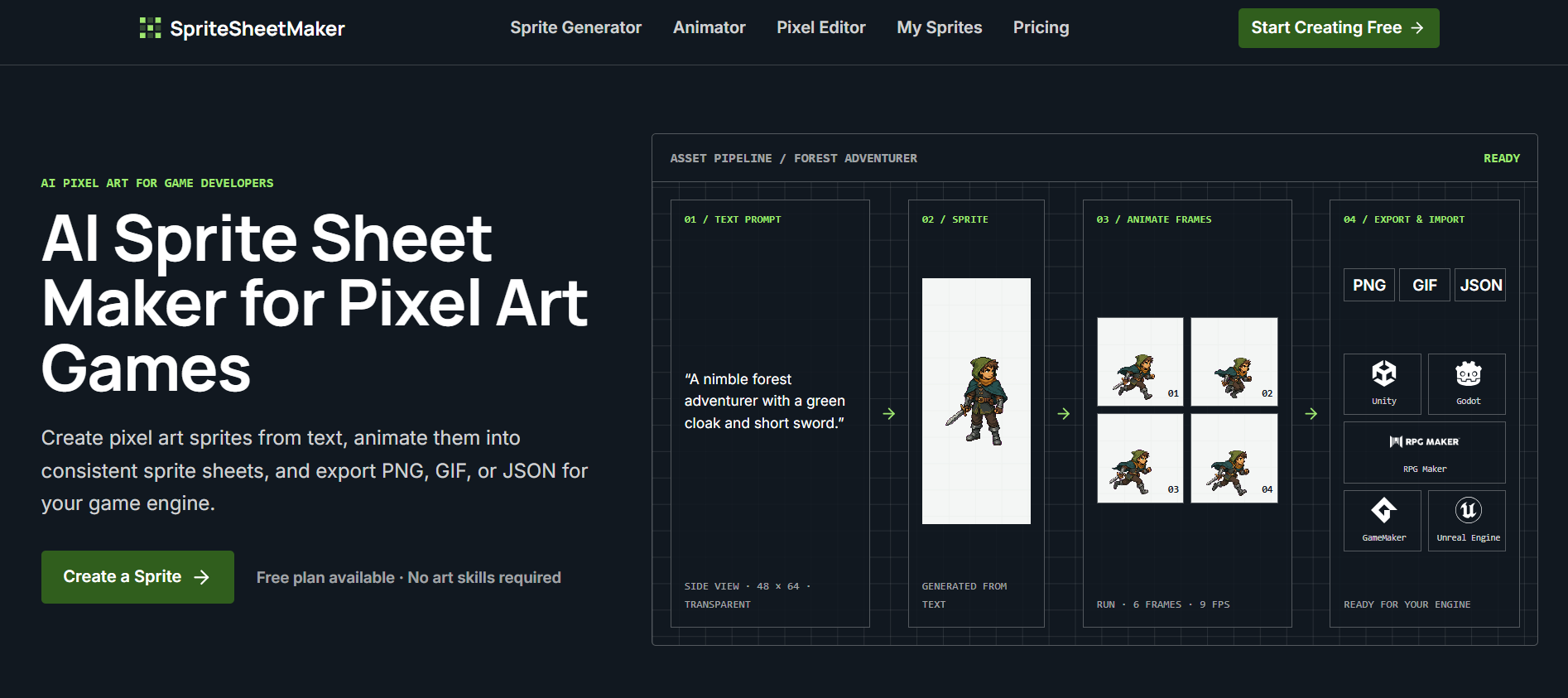
To get started with Sprite Sheet Maker, follow these four simple steps. First, describe your sprite by detailing the character, creature, item, and visual elements you want to create. Next, generate and refine your sprite by choosing the perspective, direction, size, and outline. After that, select an animation by determining the action, frame count, and generation mode. Finally, export and import your files to bring them into your project.
Sprite Sheet Maker offers a user-friendly interface that allows you to create sprites efficiently. Here are some key features that enhance your experience:
Generate sprites from text descriptions or reference images.
Refine your sprite's details with customizable options.
Export your creations in formats suitable for various game engines.
Start for free and scale your usage as your project grows.
Ready to see what Sprite Sheet Maker can do for you?and experience the benefits firsthand.
Key Features
How to Use
Visit the Website
Navigate to the tool's official website.
Pros & Cons
What's good
What's not good
Pricing
- For hobbyists and beginners
- Limited credits for sprite generation
- Basic features
- 14400 Credits Per Year
- Up to 7200 images
- Ads-Free Experience
- Unlimited Storage
- 14400 Credits Per Year
- Up to 7200 images
- Ads-Free Experience
- Unlimited Storage
- 31200 Credits Per Year
- Up to 15600 images
- Ads-Free Experience
- Unlimited Storage
- 31200 Credits Per Year
- Up to 15600 images
- Ads-Free Experience
- Unlimited Storage
- 57600 Credits Per Year
- Up to 28800 images
- Ads-Free Experience
- Unlimited Storage
- 57600 Credits Per Year
- Up to 28800 images
- Ads-Free Experience
- Unlimited Storage